
The Inventory Transactions page currently contains the Transfer Requests table where administrators can manage inventory transfer request initiated by the auto-replenishment product setting.
This setting will automatically trigger a transfer request to replenish the available inventory of a Fulfillment product into the product's Default Pick Location. The transfer request is sent by MarketDirect Fulfillment when the inventory in the Default Pick Location falls below a set minimum quantity. Inventory will be moved from other locations to the Default Pick Location based on the Inventory Pick Strategy.
To enable the setting:
1 Go to Administration > Products.
2 Create a new FF-Inventory product or edit an existing one.
3 Open the Inventory tab.
4 Verify that a Default Pick Location and Inventory Pick Strategy are selected.
These settings must be configured to ensure the Auto Replenishment to Default Location setting works.
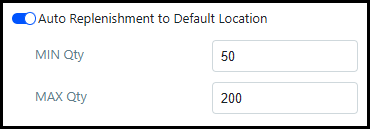
5 Enable the Auto Replenishment to Default Location setting.
6 Enter the minimum quantity (MIN Qty) of inventory allowed in the Default Pick Location before an inventory transfer request is triggered.
7 Enter the maximum quantity (MAX Qty) of inventory allowed to be replenished automatically.
Inventory can be moved from multiple locations
to accommodate the auto-replenish transfer request.
If there is not enough inventory to complete the request, all available
inventory for the product will be moved to the Default
Pick Location.
If there is no additional inventory
available for the product, then a transfer request will NOT be sent.
The maximum quantity (MAX Qty) does not limit the amount of inventory allowed in the Default Pick Location.
Inventory transfer request triggered by the Auto Replenishment to Default Location setting will be available in the Transfer Requests table.
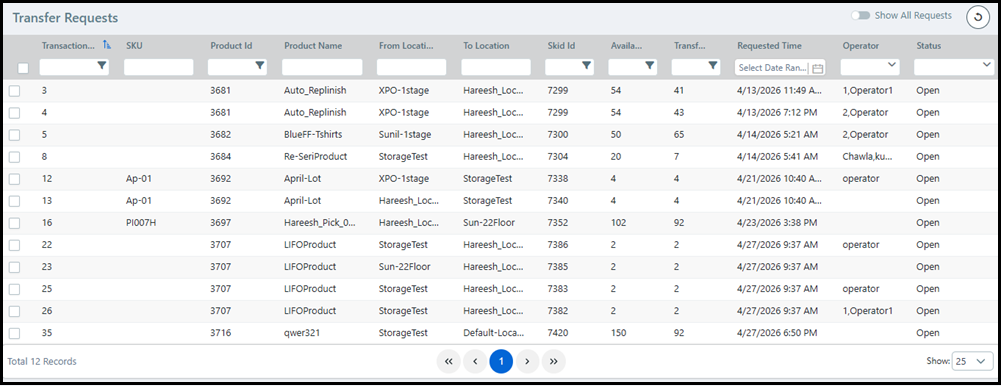
To access the table:
1 Go to Administration > Inventory Transactions.
2 The table contains the following columns:
Transaction ID is the unique ID created by MarketDirect Fulfillment to track the transaction request.
SKU is the optional stock keeping unit assigned to the product when it is created.
Product ID is the unique item ID auto-generated by MarketDirect Fulfillment when the product is created.
Product Name is the name of the product.
From Location is the warehouse inventory location that will be used to replenish the Default Pick Location (To Location).
The From Location is automatically selected by MarketDirect Fulfillment based on the product's Inventory Pick Strategy.
To Location is the Default Pick Location of the product sending the auto replenish request.
Skid ID is the skid containing the inventory that will be used to replenish the Default Pick Location (To Location).
Transfers involving
partial skid inventory will be placed on a new skid.
Transfers involving the entire skid inventory will stay on the same skid.
Available Skid Quantity is the amount of inventory currently available on the skid specified by the Skid ID.
Transfer Quantity is the amount of inventory that should be transferred from the specified skid (Skid ID) to the Default Pick Location (To Location).
Requested Time is the date and time the transfer request was triggered by MarketDirect Fulfillment.
Operator is the user assigned to make the transfer.
Status is the current status of the transfer.
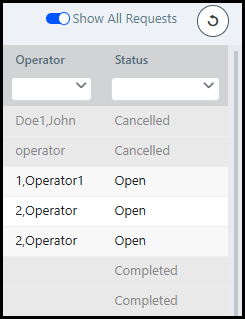
The table will only show Open
status transfer requests by
default. To see all transfer requests, enable the Show
All Requests toggle.
To assign, cancel, or complete a request:
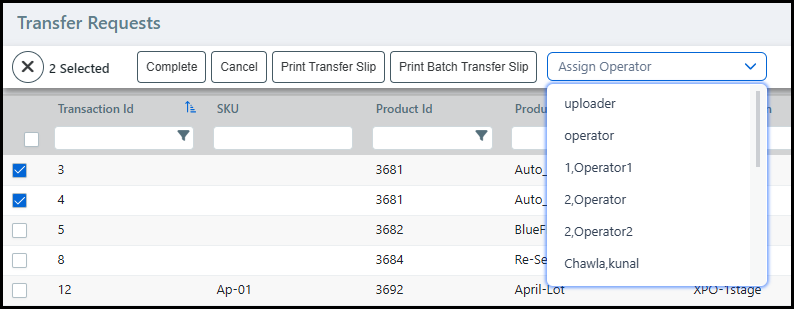
1 Select the check-box next to the appropriate transfer request(s).
You can edit the status of multiple transfer requests at the same time.
2 Click Complete to mark the transfer request(s) status as completed.
3 Click Cancel to mark the transfer request(s) status as cancelled.
3 Click Print Transfer Slip to print a separate transfer slip for each request(s).
If only one transfer request is selected, then this will be the only print transfer slip option.
4 Click Print Batch Transfer Slip to print a single transfer slip for all selected transfer requests.
5 Choose an operator from the Assign Operator drop-down list to assign the transfer request(s) to a user.